English
Free Audio Converter
Music to MP3 and 50+ formats with Freemake
Freemake Audio Converter converts music files between 50+ audio file formats.
Convert MP3, WMA, WAV, M4A, AAC, FLAC. Extract audio from video.
Completely free. No limitations, no sign-up.
Convert MP3, WMA, WAV, M4A, AAC, FLAC. Extract audio from video.
Completely free. No limitations, no sign-up.
Recognized as the best MP3 converter for 10 years. Trusted by 73 Million users.
Free Download
Version 1.1.9 (history)
Freemake has 73,667,304 users today
Convert 50+ Audio Formats
Freemake Free Audio Converter converts most non-protected audio formats: MP3, AAC, M4A, WMA, OGG, FLAC, WAV, AMR, ADTS, AIFF, MP2, APE, DTS, M4R, AC3, VOC, etc. Transcode multiple music files at once fast. All modern codecs are included: AAC, MP3, Vorbis, WMA Pro, WMA Lossless, FLAC.
Supported audio formats
Close supported formats

Supported formats for audio conversion
- mp3
- aac
- ogg
- wma
- wav
- flac
- m4a
- m4r
- amr
- au
- aif
- aiff
- aifc
- ac3
- adts
- alaw
- apc
- ape
- caf
- dts
- gsd
- gsm
- mka
- mlp
- mmf
- mp1
- mp2
- mpeg3
- mpc
- mp+
- m2a
- nut
- oma
- qcp
- ra
- rmj
- shn
- tta
- voc
- w64
- wv
- xa
Convert to MP3 for any Gadget
Convert music files to the universal MP3 format for PC, Mac, smartphone, tablet, or any MP3 player with our free audio file converter. Get MP3 sound of high quality, up to 320 KBps. The output MP3 songs will be compatible with iPhone, iPad, Zune, Samsung Galaxy, Nokia, HTC, Walkman, Huawei, Xiaomi, Honor, etc.
Supported devices
Close supported devices
Supported media for audio conversion
- iPod Touch, Classic, Nano, Shuffle
- iPhone 1-X, Xr, Xs, Xs Max
- iPad PRO, iPad Air, iPad 1-4, iPad Mini
- Microsoft Zune / Zune HD
- Sony Walkman
- SanDisc Sansa Clip / Fuze
- Philips GoGear
- Creative Zen
- Samsung Galaxy Player / Galaxy S / Galaxy Note / Galaxy Tab
- Archos Vision / Clipper
- Cowon Plenue
- Nokia Lumia / N / Xpress Music
- HTC One / Desire
- Sony Xperia / Xperia Tablet
- Asus ZenPhone
- Google Nexus
- Motorola Moto
Extract Audio from Video
Transform videos to MP3, M4A or other media format. Free Audio Converter for Windows has support for 500+ popular and rare video formats: MP4, AVI, FLV, MKV, DVD, WMV, HD, H.264, MOV, TS, WebM, Xvid, etc. Save soundtracks, extract music from clips fast. Convert any file keeping the original audio quality.
Supported video formats
Close supported video formats
Supported video formats
- avi
- mp4
- wmv
- mkv
- dvd
- mpg
- 3gp
- flv
- swf
- tod
- mts
- mov
- m4v
- rm
- qt
- ts
- amv
- avchd
- avs
- bik
- bnk
- cavs
- cdg
- dpg
- dv 1394
- dxa
- ea
- ffm
- film
- film_cpk
- flc
- flh
- fli
- flm
- flt
- flx
- gxf
- h261
- h263
- h264
- mj2
- mjpg
- mkm
- mtv
- mxf
- nc
- nut
- nuv
- ogm
- ogv
- pva
- r3d
- rax
- rms
- rmx
- rpl
- rtsp
- sdp
- smk
- thp
- vc1
- vfw
- vro
All-Purpose Music Software
Free Music Converter by Freemake can convert audio files, extract sound,
upload music to iTunes & cloud storages and much more!
Free Downloadupload music to iTunes & cloud storages and much more!

Upload Music to iPhone
Convert & upload free music to iPhone, iPad, or iPod.
The audio converter program automatically adds
M4A and MP3 files to iTunes library.
The audio converter program automatically adds
M4A and MP3 files to iTunes library.
Convert Lossless Audio
Change files to lossless audio formats and codecs.
Encode tracks into MP2, AAC, OGG, APE, WMA,
Apple lossless to FLAC. No sound quality drop!
Encode tracks into MP2, AAC, OGG, APE, WMA,
Apple lossless to FLAC. No sound quality drop!
Convert Audio Files in Batch
Encode multiple tracks to the same format, e.g. WMA to MP3
or FLAC to MP3 in batch. Set up the music utility to
convert audio files into one media file or separately.
or FLAC to MP3 in batch. Set up the music utility to
convert audio files into one media file or separately.
Join Audio Files
Merge & convert several songs into one for endless
playback. Combine audio files of the same or different
formats and qualities: MP3, WMA, M4A, OGG, FLAC, etc.
playback. Combine audio files of the same or different
formats and qualities: MP3, WMA, M4A, OGG, FLAC, etc.
Save to Google Drive & Dropbox
Select Dropbox, Google Drive, OneDrive as the
default location for ready tracks. The program will
transfer all output audio files to the cloud.
default location for ready tracks. The program will
transfer all output audio files to the cloud.
Edit Bitrate, Channels, Sample Rate
Adjust settings to achieve professional results.
Specify codec, channels, bitrate, sample rate, file size.
Choose 5.1 or 7.1 surround sound for home theatres.
Specify codec, channels, bitrate, sample rate, file size.
Choose 5.1 or 7.1 surround sound for home theatres.
Freemake is the BEST FREE AUDIO CONVERTER
73,000,000 Users
- Freemake has 73M users worldwide!
- Check our Facebook page to see how many fans adore Free Audio Converter for Windows!
110+ Awards from Tech Experts
- Freemake was nominated as best audio file conversion freeware of the year & got dozens of awards from online PC mags and bloggers.
Secured by giants for 10 years
- Our partners Microsoft, Intel, Thawte prove that Freemake Free Audio Converter is secure for download.

Rocket-Fast
Support for modern codecs combined
with quality engineering make Freemake
the fastest audio converter software.
with quality engineering make Freemake
the fastest audio converter software.
Super-Easy
Freemake is extremely simple.
Any task to convert audio files
requires 3 clicks, no more.
Any task to convert audio files
requires 3 clicks, no more.
Modern
Using Windows 10? Free Audio Converter
works under Win10 as well as
Windows 8, Win7, Windows Vista.
works under Win10 as well as
Windows 8, Win7, Windows Vista.
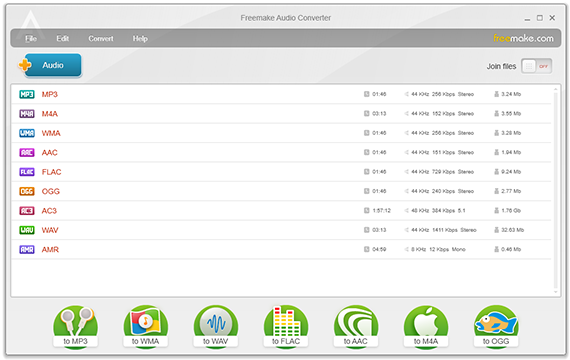
STEP 1
Add your files
Import your audio file
for conversion using the
"+Audio" button or drag-’n-drop.
for conversion using the
"+Audio" button or drag-’n-drop.
STEP 2
Choose format
STEP 3
Convert audio file
Use the default profile or
change it. Click "Convert" to
change the audio format.
change it. Click "Convert" to
change the audio format.

- Microsoft Windows OS: Windows 11, 10, 8, 8.1, 7, Vista
- Intel, AMD or compatible processor, 1 GHz
- .NET Framework 4.5 support
- 256MB or above RAM for converting
- 25 MB free hard disc space for installation settings
What experts are saying
“Quite possibly the best free audio converter available, Freemake Audio Converter is certainly the easiest to use. Highly recommended. #1 Video to MP3 audio software”.

“If you have a bunch of music files unsupported by your MP3 player, Freemake Audio Converter for PC is a simple way to convert file & solve that problem once and for all”.
Best Audio SoftwarePC World
Editor’s PickTechRadar
Top Windows FreewareFreewareGenius